




Why Silhouette Studio Beats Cricut Design Space
For many crafters, buying a cutting machine is only half the decision. The other half; and arguably the more important one; is choosing the software that powers your creativity. Whether you’re...

For many crafters, buying a cutting machine is only half the decision. The other half; and arguably the more important one; is choosing the software that powers your creativity.
Table Of Content
- Design Freedom Starts with the Right Software
- 1. More Advanced Design Tools Built Right In
- 2. Create Designs Instead of Just Assembling Them
- 3. Greater Control Over Imported Files
- 4. Powerful Offline Workflow
- 5. Flexible Software for Growing Businesses
- The Silhouette Design Store Expands Your Creative Possibilities
- More Software Editions to Match Your Needs
- Basic Edition
- Designer Edition
- Designer Edition Plus
- Business Edition
- Better for Makers Who Love to Customize
- Personalized Gifts
- Layered Paper Art
- Stickers
- Small Business Products
- Designed to Work Seamlessly with Silhouette America Machines
- Is Cricut Design Space® a Good Choice?
- Final Thoughts: Creativity Shouldn’t Have Limits
Whether you’re designing custom stickers, layered paper art, personalized gifts, home décor, or products for your small business, your design software determines how much creative freedom you actually have.
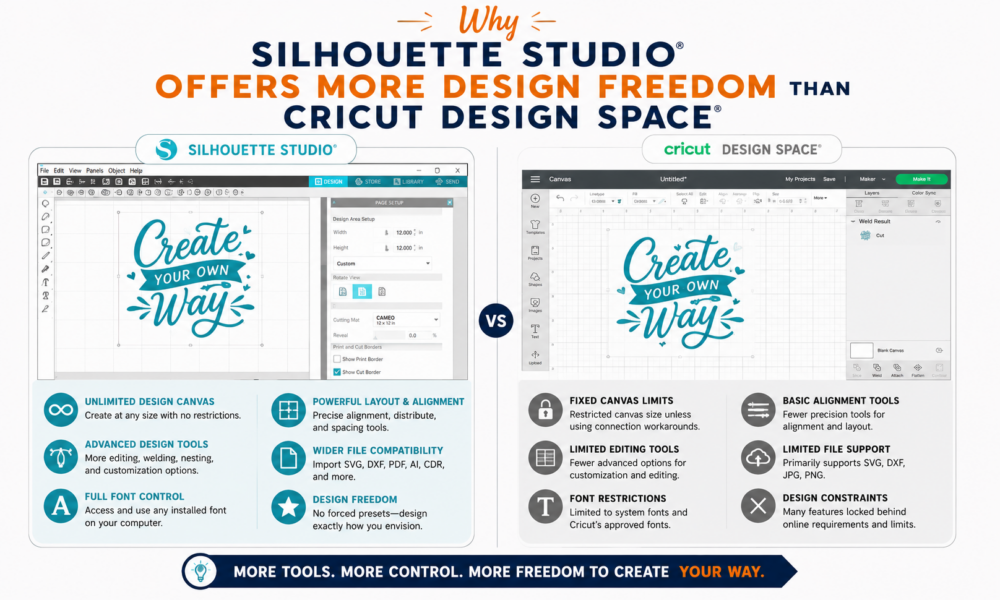
While both Silhouette Studio® and Cricut Design Space® help users create amazing projects, they take very different approaches to design. Cricut Design Space focuses on simplicity and guided project creation, while Silhouette Studio®, developed by Silhouette America, provides a more feature-rich environment for creators who want greater control over their designs.
Let’s explore why so many hobbyists, professional makers, and small business owners choose Silhouette Studio® when creative flexibility is their top priority.
Design Freedom Starts with the Right Software
As your crafting skills grow, so do your creative ideas.
You may want to:
- Design original artwork
- Personalize customer orders
- Create layered SVG-style projects
- Edit existing graphics
- Build complex Print & Cut layouts
- Produce professional products for sale
To accomplish all of this efficiently, your software needs to do more than simply send designs to a cutting machine; it should become your creative workspace.
That’s exactly where Silhouette Studio® shines.
1. More Advanced Design Tools Built Right In
One of the biggest strengths of Silhouette Studio® is the breadth of design tools available directly within the software.
Instead of relying on separate graphic design applications for everyday edits, users can access features such as:
- Point (node) editing
- Shape modification
- Offset creation
- Weld, subtract, divide, and crop tools
- Trace functionality
- Advanced alignment
- Replicate tools
- Layer management
Higher editions of Silhouette Studio® unlock even more capabilities, including SVG import, advanced warp tools, nesting, media layout optimization, barcode workflows, and SVG export for Business Edition users.
For many makers, this means fewer interruptions and a smoother creative process.
2. Create Designs Instead of Just Assembling Them
Many crafting projects start with inspiration; but not necessarily a ready-made file.
Perhaps you want to:
- Draw your own floral artwork
- Create a custom logo
- Build layered shadow boxes
- Design personalized wedding invitations
- Make unique business packaging
Silhouette Studio® gives creators the tools to design from scratch or significantly customize existing artwork.
While Cricut Design Space® includes useful editing features for everyday projects, its primary focus is project assembly rather than comprehensive design creation.
For users who enjoy designing as much as crafting, Silhouette Studio® provides considerably more room to grow.
3. Greater Control Over Imported Files
Many crafters purchase SVGs from marketplaces or create artwork in external programs.
Silhouette Studio® (Designer Edition and above) supports importing SVG files, while Business Edition also supports exporting SVGs and importing additional professional file types such as AI.
Once imported, creators can:
- Modify paths
- Edit shapes
- Resize without losing quality
- Rearrange layers
- Customize designs extensively
This flexibility is especially valuable for makers producing personalized products or adapting purchased artwork to fit specific customer requests.
4. Powerful Offline Workflow
One of the features many experienced users appreciate is that Silhouette Studio® is a desktop application.
Once installed, you can continue creating, editing, organizing, and preparing projects using locally stored files; even if your internet connection isn’t available.
This benefits:
- Small business owners
- Teachers
- Craft fair vendors
- Home-based creators
- Anyone with unreliable internet service
Your creativity doesn’t have to pause because your Wi-Fi does.
5. Flexible Software for Growing Businesses
If you’re selling handmade products, design flexibility quickly becomes a business advantage.
Imagine creating:
- Personalized stickers
- Custom labels
- Wedding stationery
- Branded packaging
- Apparel graphics
- Seasonal product collections
These often require:
- Fast edits
- Multiple variations
- Layer management
- Repeated production
Silhouette Studio® makes these workflows easier by providing tools that help creators adjust designs without constantly moving between different software programs.
The Silhouette Design Store Expands Your Creative Possibilities
Powerful software becomes even more valuable when paired with an extensive design library.
The Silhouette Design Store offers hundreds of thousands of professionally created digital assets, including:
- Cut files
- Fonts
- Patterns
- Stickers
- Labels
- Home décor graphics
- Seasonal collections
- Business templates
The real advantage is flexibility.
You aren’t limited to using a design exactly as it’s downloaded.
Instead, you can:
- Resize it
- Combine it with other designs
- Add personalized text
- Modify layers
- Create entirely new project variations
The Design Store becomes a starting point; not a creative limitation.
More Software Editions to Match Your Needs
Another advantage of the Silhouette ecosystem is that the software grows with you.
Silhouette Studio® is available in multiple editions:
Basic Edition
Ideal for beginners and included free with Silhouette machines.
Designer Edition
Adds SVG import, additional design tools, layers, and expanded editing features.
Designer Edition Plus
Introduces advanced creative tools like FlexiShapes, advanced warp options, and embroidery file support.
Business Edition
Designed for advanced users and small businesses, adding features such as:
- SVG export
- AI file import
- Automatic nesting
- Media Layout View
- Barcode support
- Multi-cutter support
- Enhanced production workflows
This allows creators to invest in additional functionality only when they need it.
Better for Makers Who Love to Customize
Silhouette Studio® is particularly well suited for creators who rarely make the same project twice.
For example:
Personalized Gifts
Quickly adjust names, dates, and wording.
Layered Paper Art
Modify individual layers without rebuilding the project.
Stickers
Customize layouts, spacing, and cut lines.
Small Business Products
Create multiple versions of labels and packaging from one master design.
Instead of working around software limitations, you spend more time bringing your ideas to life.
Designed to Work Seamlessly with Silhouette America Machines
Of course, software is only part of the experience.
Silhouette Studio® is designed specifically for Silhouette America cutting machines, including:
- Cameo® Series
- Portrait® Series
- Curio™ Series
Together, the hardware, software, and Silhouette Design Store create an integrated creative ecosystem where ideas move smoothly from concept to finished project.
Whether you’re cutting cardstock, vinyl, heat transfer material, sticker paper, or specialty media, the workflow remains intuitive and highly customizable.
Is Cricut Design Space® a Good Choice?
Absolutely.
Cricut Design Space® is known for its approachable interface and is an excellent option for beginners who want a straightforward project-building experience.
However, as many makers gain experience, they begin looking for:
- More advanced editing tools
- Greater file flexibility
- Offline capabilities
- Better customization options
- Professional production features
These are areas where Silhouette Studio® is often preferred by advanced hobbyists, designers, educators, and growing craft businesses.
Final Thoughts: Creativity Shouldn’t Have Limits
The best crafting software isn’t simply the easiest to learn; it’s the one that continues to support your creativity as your skills evolve.
With advanced editing tools, flexible workflows, offline functionality, multiple software editions, and seamless integration with the Silhouette Design Store, Silhouette Studio® gives makers the freedom to create projects that are uniquely their own.
Whether you’re designing custom stickers, intricate paper crafts, vinyl decals, personalized gifts, or products for your business, the combination of Silhouette America machines, Silhouette Studio®, and the Silhouette Design Store provides a creative ecosystem built to grow with you.
If your goal is not just to make projects; but to design them your way; Silhouette Studio® offers the flexibility, control, and creative freedom to help bring every idea to life.







No Comment! Be the first one.